
MWA Spectral: The Mixing and Mastering Analyser That Is Fun to Look At
By Omar Meho, 15 November 2026
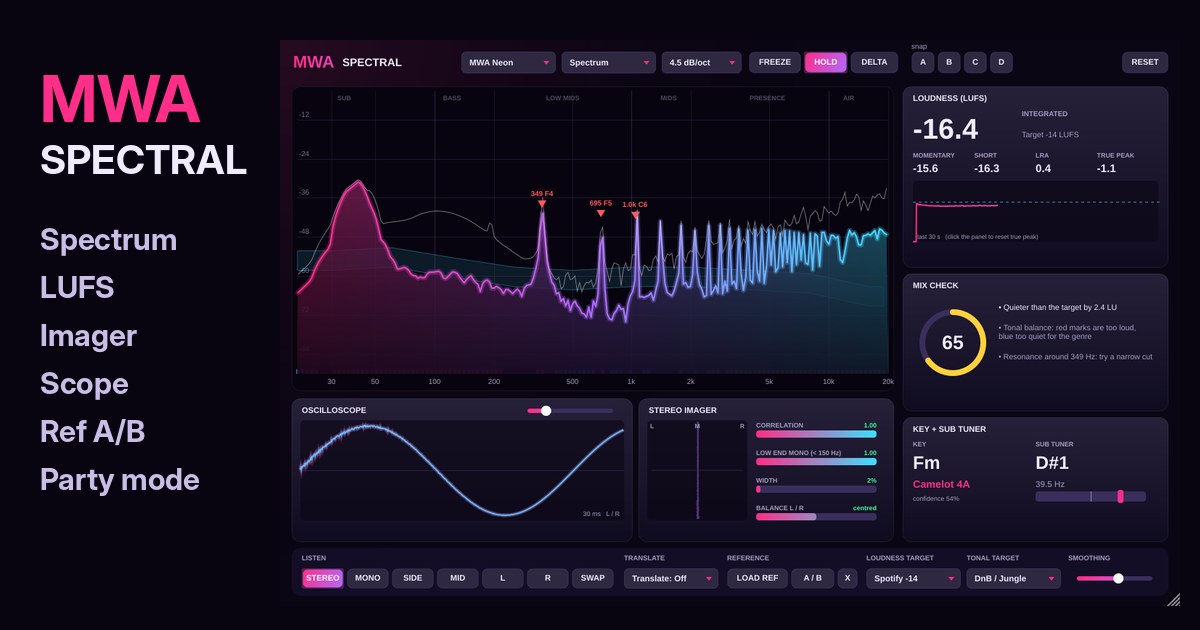
Most mixing problems are things you could have seen. Too much sub, a harsh ring at 3k, a master that is 4 LU too quiet for Spotify, a bass that falls apart in mono. MWA Spectral puts all of that on one screen, and it looks good enough that you will want it open all session.
What it does
- Spectrum analyser: a smooth glowing curve with peak hold and a 0, 3, 4.5 or 6 dB per octave slope. Hover to read the frequency, the musical note and the level.
- Hear any band: hold the mouse on the analyser and you hear just that band. The fastest way to find mud, boxiness or harshness.
- Loudness: integrated, short term and momentary LUFS, LRA and true peak, with targets for Spotify, Apple Music, YouTube, SoundCloud, the club and a loud DnB master.
- Stereo imager: a vectorscope, correlation, a low end mono check under 150 Hz, width and left right balance.
- Oscilloscope: see your waveform and transients, locked so it stands still.
- Listening tools: Mono, Side, Mid, Left, Right and Swap, plus Translate, which lets you hear your mix like a phone, earbuds, a laptop, a car or a club.
- Reference tracks: load a track you love, see its curve over yours, and A/B it level matched. Delta view shows exactly where your mix is louder or quieter.
The 10 MWA extras
- Tonal targets for DnB and jungle, house, tech house, techno, UK garage, dubstep, hip-hop and pop. Red marks are too loud for the genre, blue too quiet.
- Problem spotter: it flags resonances with the frequency and note, so you know exactly where to cut.
- Band audition: hold to solo any part of the spectrum.
- Release score: 0 to 100, with plain English tips on loudness, true peak, phase, mono low end, balance and resonances.
- Translate: phone, earbuds, laptop, car and club listening.
- Live key detection with Camelot numbers, handy for DJs.
- Sub tuner: the note and cents of your sub, so the bass sits in key.
- Reference level match and delta.
- Snapshots A to D to compare before and after.
- Party mode: a beat reactive visualiser for the master, live streams and the studio screen.
It also comes with seven skins: MWA Neon, Ice, Acid, Sunset, Rainbow, Danjah and Studio Mono.
How I use it on a master
- Put MWA Spectral last on the master channel.
- Pick your genre in Tonal Target and your platform in Loudness Target.
- Play the loudest 30 seconds and read the release score tips.
- Load a reference you love and flick A/B. Fix the biggest difference first.
- Check Mono and Translate: Phone. If the bass disappears, add some harmonics.
- Switch the listening tools back to Stereo and Off before you export. The plugin shows a red warning while any of them are on.
Pro and Lite
MWA Spectral Lite is free: the spectrum, oscilloscope, LUFS, imager and mono check. MWA Spectral Pro adds everything else above for £39, paid once. Both run on Mac (AU and VST3, Apple Silicon and Intel) and Windows (VST3).
Want to learn mixing and mastering properly? The MWA Ableton Course has a full mixing and mastering section, and it now includes a lesson on using MWA Spectral.